I have a 166 MHz Test Tag that has not been showing up on newly installed Motus tower. Tower works for 434 MHz tags (all 5 were detected) but the 166 is not showing up.
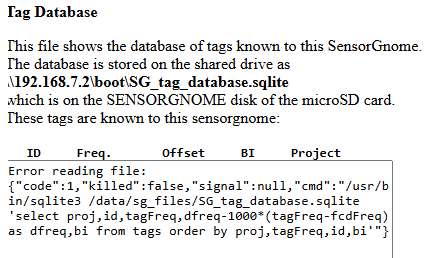
Error reading file: {“code”:1,“killed”:false,“signal”:null,“cmd”:“/usr/bin/sqlite3 /data/sg_files/SG_tag_database.sqlite ‘select proj,id,tagFreq,dfreq-1000*(tagFreq-fcdFreq) as dfreq,bi from tags order by proj,tagFreq,id,bi’”}
I know how to go in the command line, maybe try to fix it there?
Thank you!! So much! I’m just trying to figure out why is the tag not showing up.. :) and then I will try to test the tower range once this tag gets detected. I know it is on, I can hear it on SRX Lotek receiver…
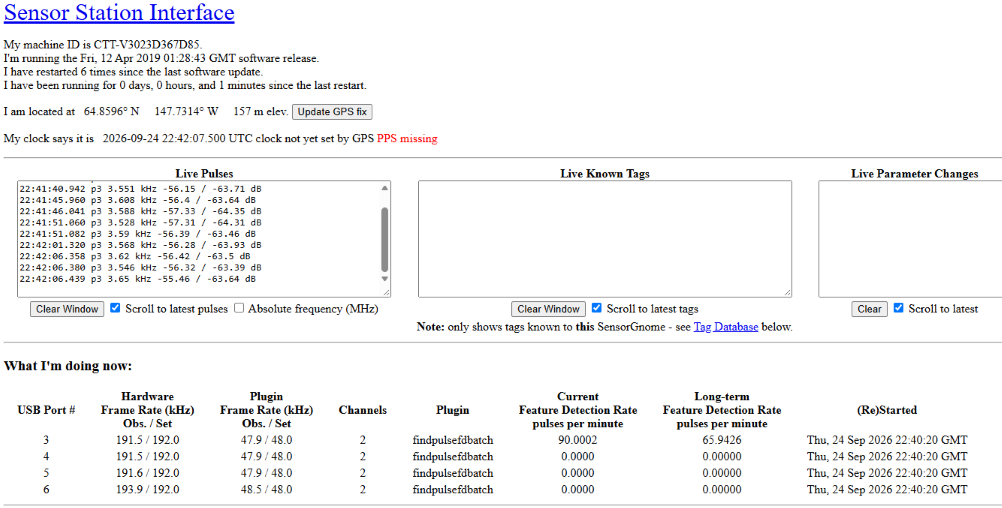
Here are also "Live Pulses and activity on USB port #3…
Eva, the error message look very familiar. i suspect it is due to sqlite file getting corrupted during upload to the sensorstation. i have a written a cheat sheet for what has worked for me. see this similar post in the motus community forum. it’s buried in there. if you cant find it there , or if it still fails please post back and we can try to work through it. https://community.motus.org/t/tag-database-file-upload-fail/1289
-Rich
Unfortunately, I don’t know all the in’s and outs of the sensor station aspects of MOTUS. I know just enough to get into trouble bud not enough to get out. Sorry I can’t be more of a help on this.
Thanks,
Mike
Michael T. Hallworth, Ph.D.
Conservation & Data Scientist
Vermont Center for Ecostudies
Norwich, VT. 05055
Thank you Rich and Mike! Unfortunately, I didn’t manage to go and correct it, so I will continue next week. Thank you so much for your support, everyone!! :) Have a great weekend!!
Hi Rich, I just did what you suggested in your detailed instructions and it was QUICK and EASY to follow and i had it done in 20 minutes! Thank you so much! Now I can go around the town and start the real testing to see how far the tags will get detected! Thank you so much again!!