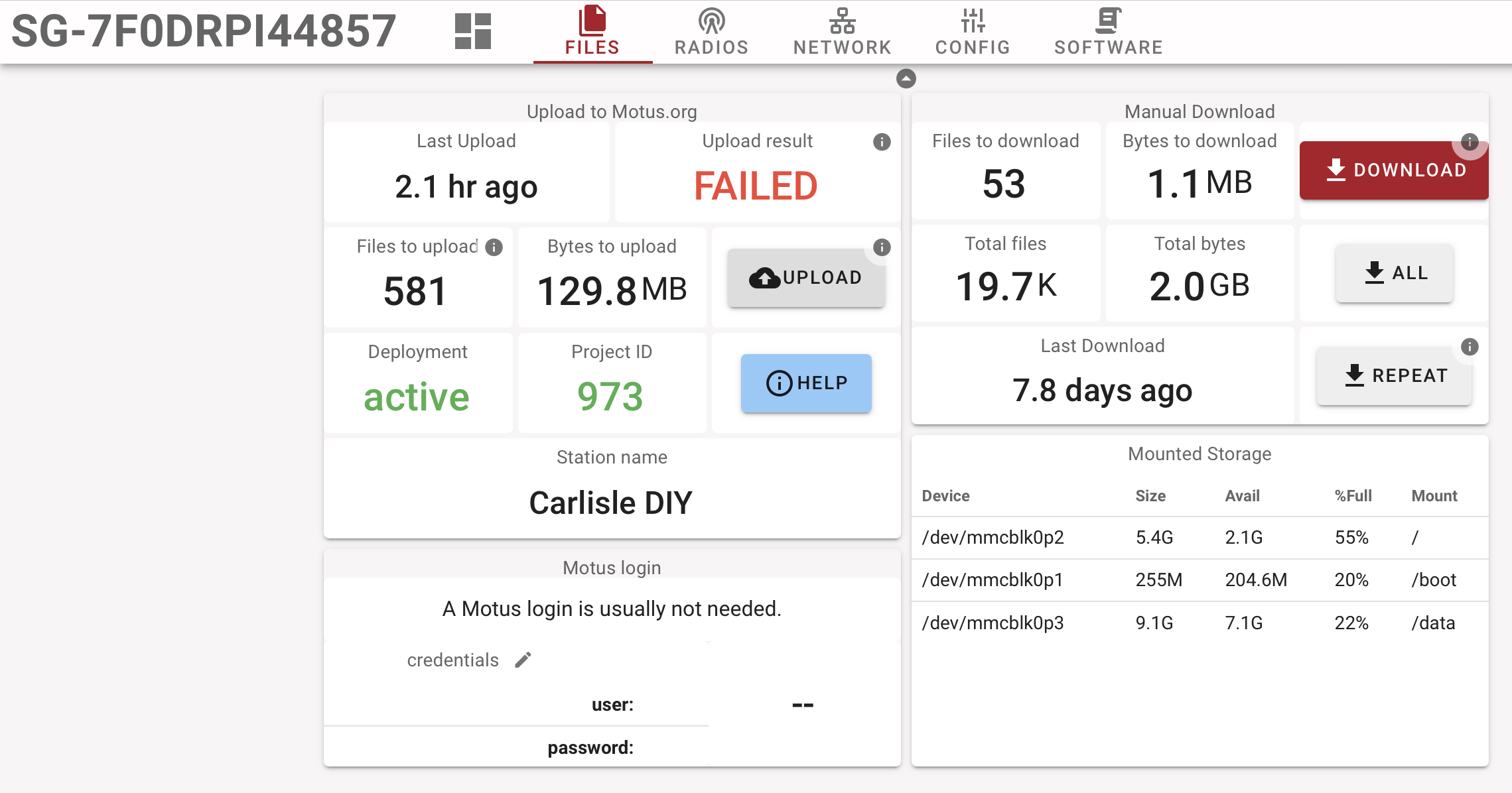
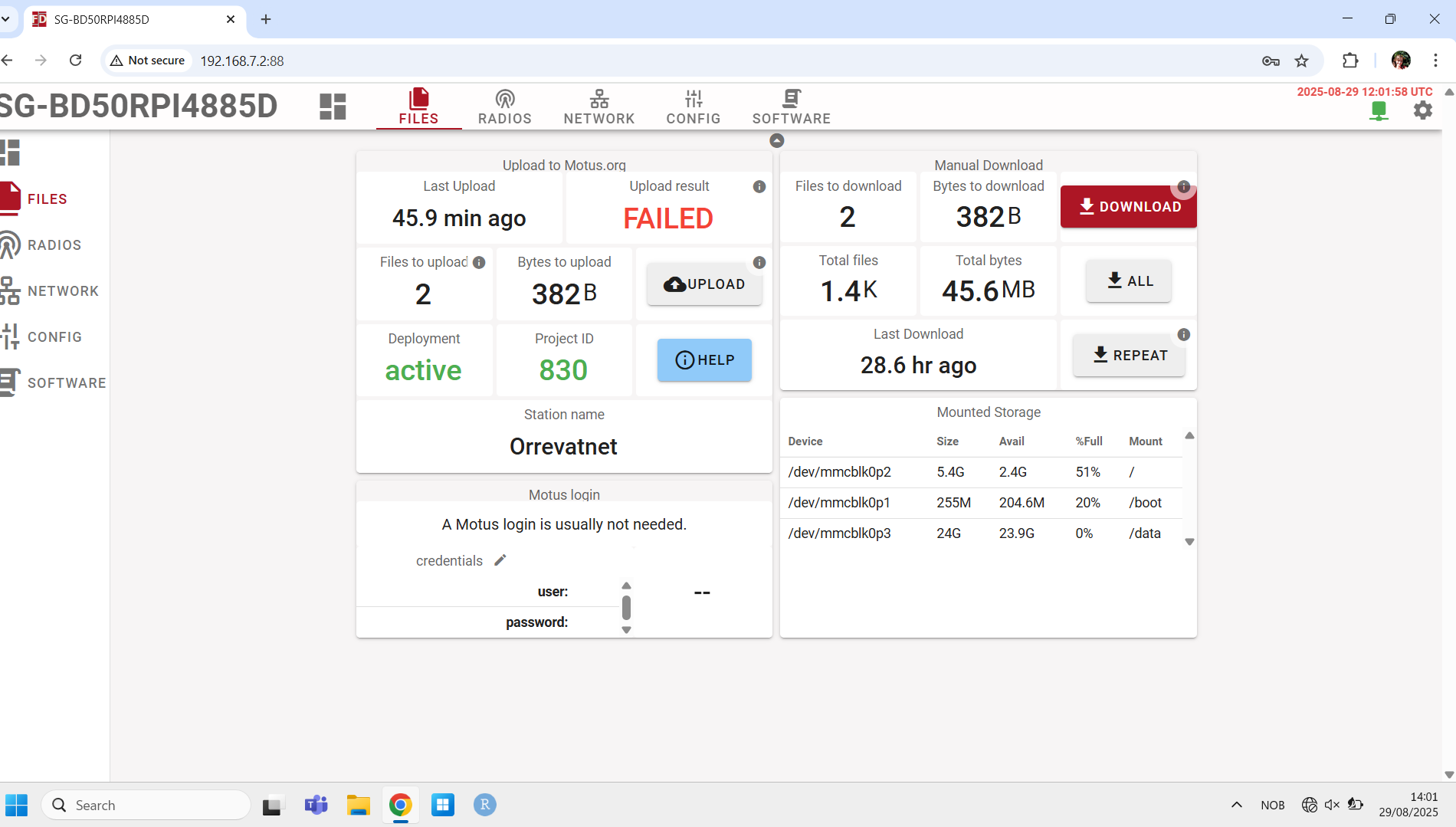
We have a station that is working fine, except for 2 files that it’s not able to upload so the upload status is constantly “Failed“. It seems to upload all the other, newer files, but is always has 2 files to upload that it’s failing on.
The Motus server says that the two files have already been uploaded and somehow the SG upload system doesn’t understand that. Not sure why not, have not looked at the code.
Hei Thorsten - I am Maris’s colleague. We checked and these two .gz files are not zero-length. Neither of us are familiar with .gz files. Do you know what else we can do to inspect these files further so we can determine if it is worth deleting them? Thanks for your quick help!
Were these very large files? The reason i ask is that I now have two stations with constant “FAILED” upload status. Both see a fair bit of signal noise (especially during the day). This second station is near a prairie ravine but also near a very high voltage power line corridor.
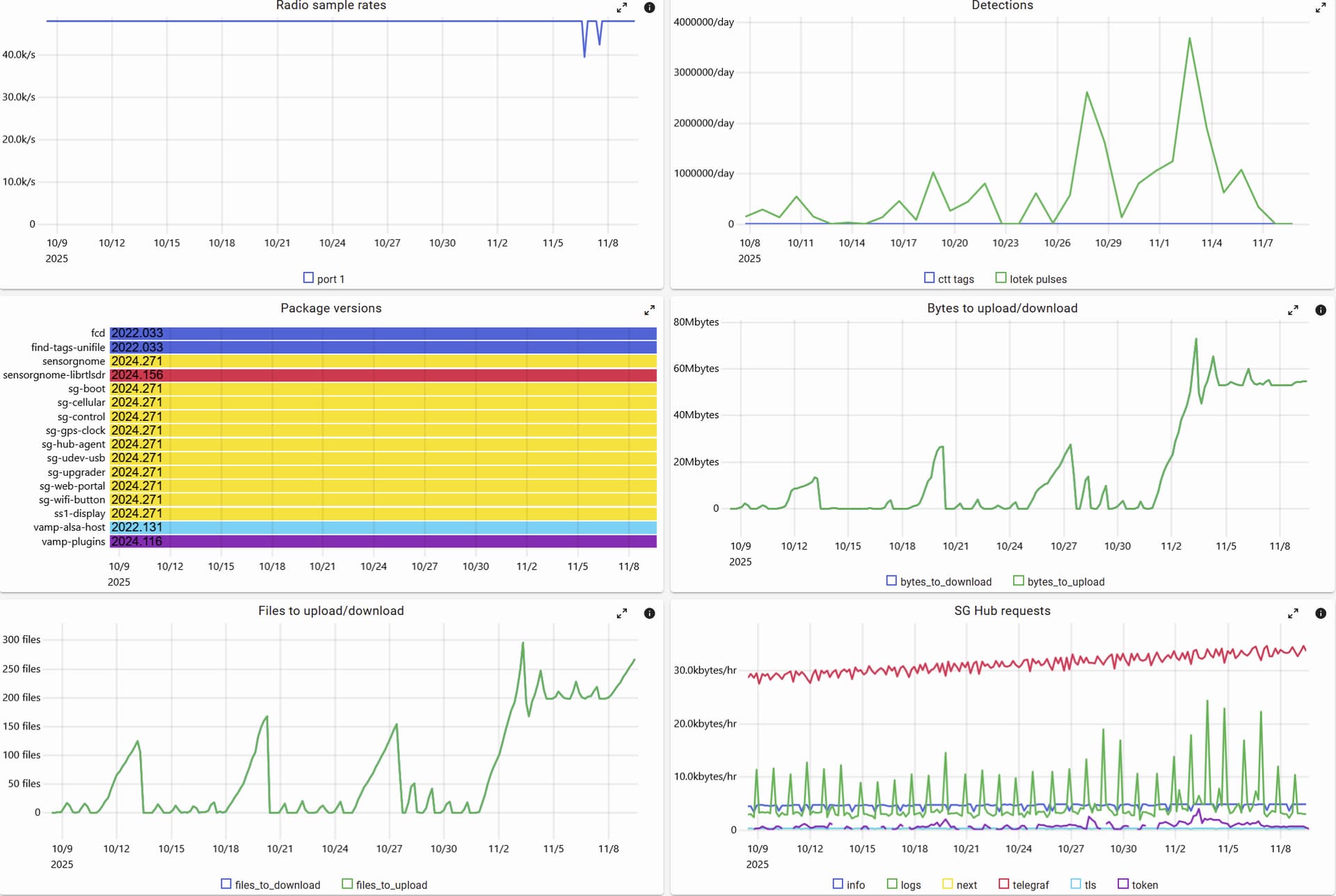
The latest station became “FAILED” during one of the weekend server failures/outages (around 11/2 in the graphs below) and now no longer goes back zero in terms of files and bytes to upload.
Around the same time one can see a significant spike in noisy detections. So I’m guessing the files at the time were large.
Is there a way to tell how/why these files are not making the trip to the server?
Your SG accumulated 200 files to upload in a short time period (1-2 days) and I don’t know why they’re not uploading. I do see upload timeouts, it could be that the server is just too overloaded or perhaps the connectivity is too poor? I would give it a bit more time given that not all uploads are failing systematically.
(What could be happening is that hourly uploads succeed ‘cause they’re short but catch-up uploads fail because they’re much bigger.)
Indeed, there are some serious processing issues at the moment, mostly related to the very large backlog of files we’ve been trying to get through for the past several weeks. To help address that, we’ve been periodically throttling uploads from V2 SG, which likely explains all (or at least most) of those outage periods in Thorsten’s screenshot.
I’m unsure if, during one of these periods where uploads are throttled, the SG itself will report “failed” (@user151 would have a better idea of how we’re throttling) but it’s quite likely.
I too have a station with failing uploads. When looking in SG Hub it is mostly red with a few blips of green now and again. My station is pretty noisy during the day as well. I suspect a file too large to upload is congesting the upload process. I had some detections that I didn’t know were received due to the latency in uploading. A manual upload occasionally starts and then fails, but typically it fails immediately.
Is there a way to confirm it is a stuck file? How can I rectify this? Is there some way to limit files getting too large?
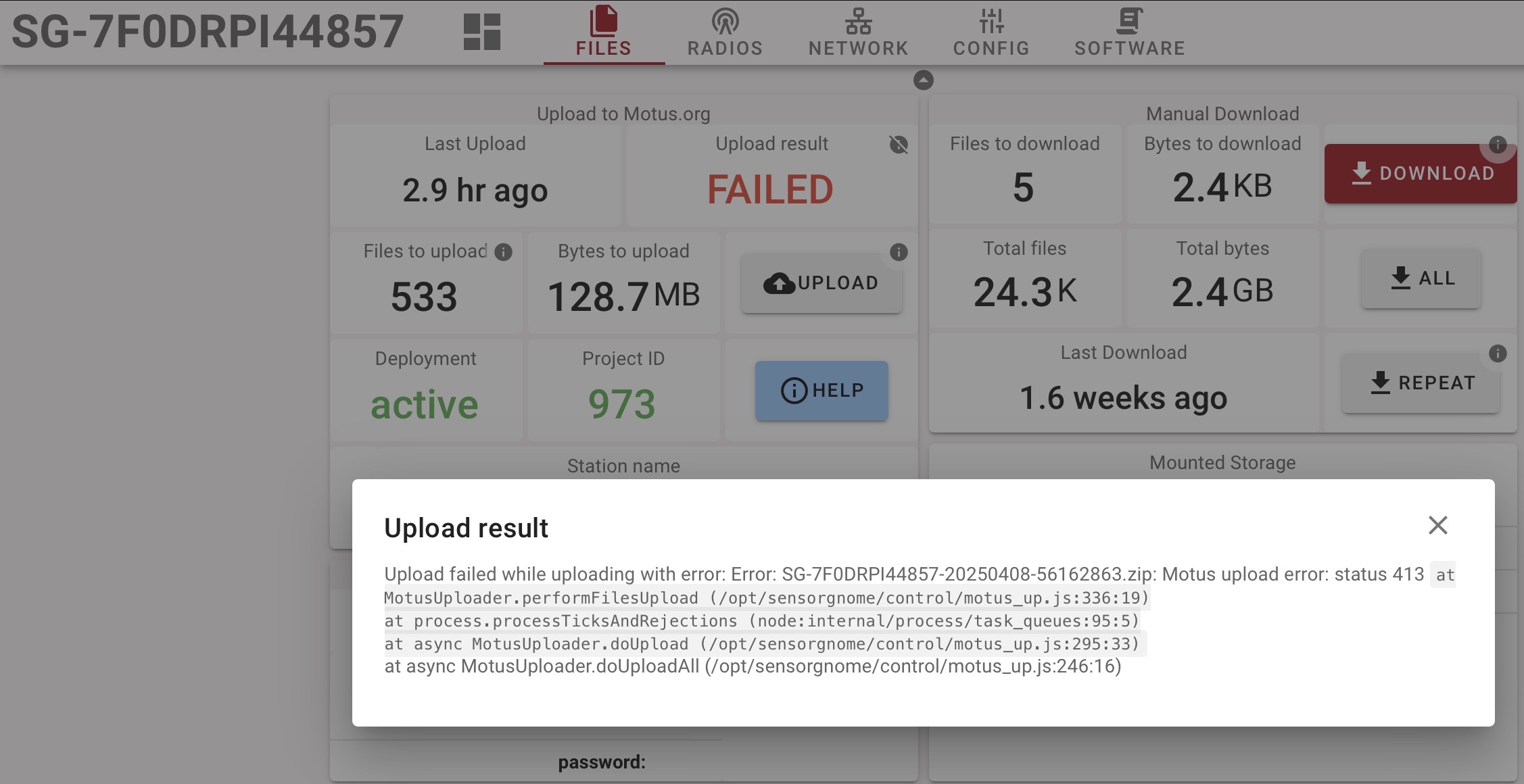
I was hoping the improvements to the server would help with my failed uploads, but my station is still struggling. Despite an occasional green blip on SG Hub, 581 files amounting to 128ish MB remain. Error 413 seems to be the cause. Has anyone seen and overcome this?
@Techbirder your stations produces several different upload errors, ugh! An important detail to know is that the SG always uploads files for at most one day at a time, so if there is one day that causes issues it does not generally prevent other days from being uploaded. That one day produces a ton of errors due to retries which can produce an all-red bar even though other uploads proceed fine.
The status 413 signifies that the upload is too large. I’ve seen one where the upload size is a tad over 36GB. I thought the limit had been raised server-side, but I don’t recall the specifics. I did see this happening for multiple days (e.g. your screen shot says 2025-04-08) which to me suggests that your station is picking up a ton of noise, which is what creates these huge files. So the good news is that data does get uploaded the bad news is that with high probability any actual detections are drowned by noise.
My recommendation would be to spend some time looking at what the radio receives (on the radio tab of the local web interface) and figuring out how to reduce the noise, for example, by aiming the antenna differently.
There is another error, which says Error: SG-7F0DRPI44857-20260304-2d4227dd.zip: Unexpected token < in JSON at position 2 which smells like a bug and I will have to track that down.
Thanks! That’s good to know that the data is still being uploaded. I did have 3 detections this past Fall, so I figured some data was getting uploaded. I will play around with the antenna positioning.
What is the best way to purge the “bad” data to start fresh once noise levels are low? Would that be a manual delete? I’m not fluent with Linux, but I should be able to figure it out with some direction on file location.
Our original problem got solved by the fact that we powered down the station for the winter, I guess there are really no other lessons to learn from that one.
However now one of our other stations, SG-DDC6RPI4682F is having the same problem as described further down in the topic, where 133 files from one day, 11/04 is constantly failing and making a red bar, while actually all the other data is uploading as expected. We also have an error code 413 and are not sure how to address this issue the next time we are heading to the station.
Has anyone managed to actually get rid of the error with manually deleting the file?
Hi Maris, one option is to download (to your computer) all the detection data files that aren’t uploading, then delete them from the SG. You can then zip and upload the detection data through Motus.org to ensure that everything has been uploaded. A GUI like FileZilla or WinSCP makes it pretty simple to find, copy, and delete only the files you are interested in.
And if this is a relatively remote station, you may want to flash a new SD card ahead of time with the most recent stable image. Swap and initialize that when you’re there and you’re starting as fresh as possible. Just make sure you get everything you need off the old card before reusing it!
@Maris_P I played some tricks on the back-end and now the SG has uploaded the non-humongous 4/11 files fine. Let me know if this recurs (I see that 4/23 also had a ton of noise but it seems to have squeaked by under the upload size limit.
BTW, HTTP error 413 means that the uploaded file (archive) is too large and was rejected by the server.
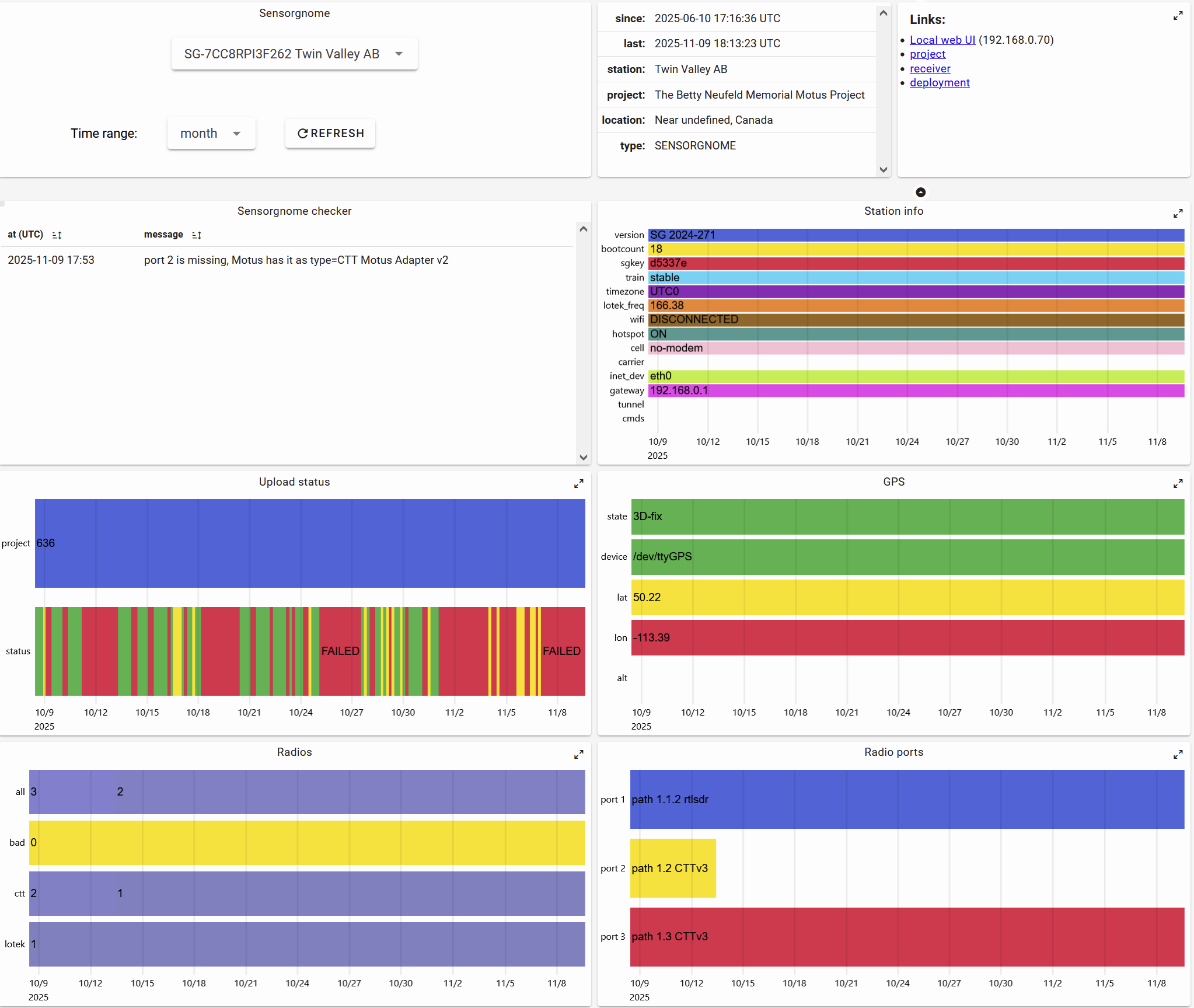
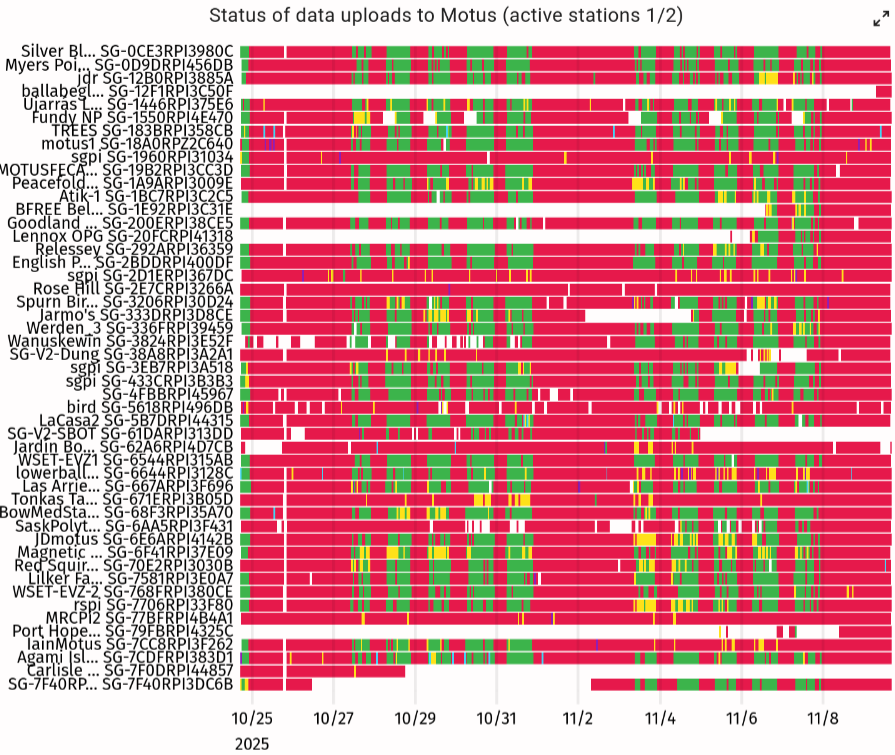
 But with a bit too much red.