Our group got our first SensorGnome running about a month ago and we are still very much in the kindergarten phase of learning. We had no luck getting the cellular modem to connect, but eventually managed to configure the WiFi client and get it talking to MOTUS. The weird part is the SG will start uploading the detection data, then after a minute of so it indicates the upload failed. Yet we can do a manual download to the phone and immediately login to into MOTUS.org website from the phone’s browser and successfully upload the data file. Any suggestions as to why the RPi doesn’t like to communicate directly to MOTUS?
It really helps if you provide the SG ID so I can look up the log files on the server, also leaving the SG connected to the internet (e.g. wifi) allows the log files to upload. Screen shots of what the Web UI shows in the cellular panel and in the network connectivity pane help troubleshooting. Cellular is very finicky…
Unfortunately there is no regular WiFi or Ethernet available (only connecting via phone) where our SG is housed, and I’d have to arrange with our town’s parks department to unlock the building and room it is located in to get physical access to the SG - and that can take some coordinating to make happen. I have saved a series of screenshots but failed to figure out how to attached them to my post. The receiver ID is SG-0934RPI3A060
I’m a bit confused, the title of your post says “cellphone hotspot” while in your first post you write “cellular modem”… which of the two are you trying to use? Or what are the steps you are taking?
We initially tried using the cellular modem that came with the unit. Gave up on it after we found out how easy it was connecting with a cell phone. So we are connecting using a cellphone as a hotspot and (for now) downloading the ZIP file to our phone, then uploading to MOTUS. Since our receiver is in an accessible location it just doesn’t seem worth paying for the SixFab data access even if we had gotten it working.
We did find we had to add SG_Uploader as a project collaborator before the SG showed an OK connection to MOTUS using the cellphone hotspot. And after the the first few attempts at uploading the detection files failed we tried entering our MOTUS credentials into the SG, but it eventually comes back with a Invalid User/Password error.
So do you start the phone hotspot, wait for the SG to connect to it, then find its IP address on your phone and use that to point your browser at the SG? Or perhaps https://sgpi.local works? Or do you have the hotspot running on the SG and you connect to it with your phone and simultaneously start a hotspot on your phone and use the SG’s Web UI to connect back to your phone and internet?
Looking at SGhub, your SG had internet connectivity on 9/26-9/27 and 9/30-10/01, the most recent logs I have are for 9/26. You should not enter Motus creds into the SG (I should remove that option…), the reason I see downloads failing is “Receiver not registered with a project”. Maybe you’ve fixed that by now, but it does prevent uploads. (This error should show on the “front tab” of the web UI.)
The reason the cellular doesn’t connect is that it’s searching for a network and times out. It may be that it wasn’t running long enough, hard to tell. I’m also seeing some errors that I’m not used to so it may benefit from a power cycle (reboot doesn’t do much to the modem, unfortunately). It could be that, being in a building, it can’t connect, e.g. metal window-less utility bldg. The cell modem stuff is frustrating…
The front screen of our UI shows Deployment - active and Project ID 889 Station Name Salmon Arm bay. 1.3k files to upload. I have been connecting to the SG UI from my phone first, then turning on the hotspot on my phone. Once the Network connectivity shows MOTUS.org green and OK I attempt the file upload, which cycles through - authenticating - uploading - failed
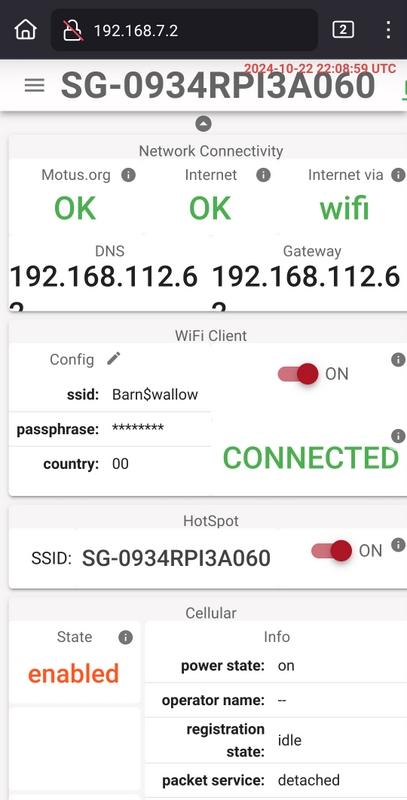
The authentication failure rings a bell, I need to go back through my notes and compare with the logs. I’ll get back to you.