So, after about six months, our research group was finally in a position to test our new-build SGv2s with a live radio tag before deployment (it’s been a bit of a complicated year). Unfortunately, we’re not seeing any tag pulses on any of the three new SGv2s.
The configuration for each one is a Raspberry Pi 4B, running the sg-armv7-rpi-2.0-rc14.zip software distro. It has a Waveshare SIM7600 4G HAT, and one FunCubePro+ digital radio receiver. Statuses all look okay on the web interface: the radio is there, it’s not displaying any errors, but… no pulses.
The tag is definitely running, because I can see pulses and tag IDs appearing on the SGv1s that are in for maintenance at the moment.
Note that per one of my earlier posts, the software distribution did not have the correct Australian 151.500 MHz tag frequency setting as an option; so following the supplied instructions, I edited the new value into the /opt/sensorgnome/control/dashboard.js file, and it then appeared on the frequency list. Is there a possibility this wasn’t a complete fix, and the frequency needs to be tweaked somewhere else?
Hi Andrew, the frequency setting may be a factor here… Once the receiver data has been reprocessed with the correct setting, you should see the change.
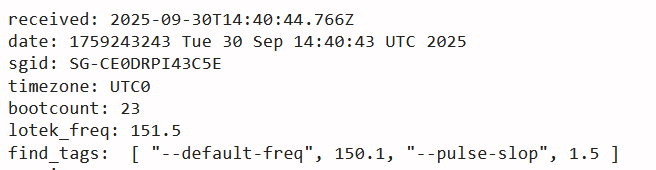
According to the logs it appears to have been set correctly, but the info log (on sensorgnome.net) appears to show the default frequency is set to 150.1, but it also says “lotek_freq = 151.5” so I’m not sure what’s going on there.
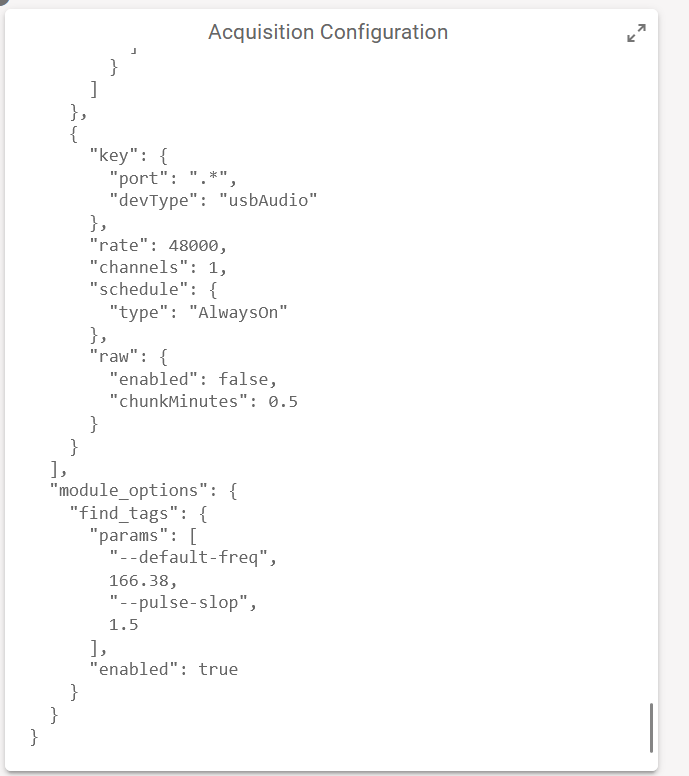
If you’re able to revisit the site, take a look at the web interface under the “config” tab to see what the –default-freq is set to under “module_options”.
I think Josh’s comment only applies to data that has been uploaded to Motus servers. If you’re seeing no pulses show up in the raw data then it’s an issue with the SensorGnome configuration.
Any progress on the problem with the radio tag tuning frequency mismatch? (Are there any other sites in Australia using an SGv2, and if so, are they having similar problems?)
Our principal investigator is very keen to put our three new SGv2 stations into the field, because it’s spring on this side of the world and our target migratory shorebirds are back after the winter, and we’re anxious to begin collecting data again. So any suggestions you might have for possible fixes, or any additional diagnostics I can carry out to try and trace the fault, would be very welcome.
Hi Andrew, I’m told it was indeed the frequency issue suggested above. We’ve made the change to the receiver, and scheduled a rerun of the data. Due to the roughly 2 week backlogs mentioned earlier that hasn’t happened yet though.
EDIT…
A bit of clarification… The frequency setting I was referring to only affects data that has been processed by the Motus server (as Lucas pointed out). However, that setting had not been implemented on our end so there would have been issues with the processed data anyway. That’s now been fixed.
But the SG frequency issue is upstream of that and there may still be problems with the configuration.
Lucas’s screenshot shows two frequencies for this receiver. As far as I know, the info logs are related to the V2 SG (and tagfinder per se) and is also the source of what is displayed on the web UI. So 151.5 should correspond what what you set in the web UI of the SG. The values in the array appear to correspond to the “acquisition configuration” (the old “deployment.txt” file). But this is no longer directly editable in the UI. It should reflect what you set in radios panel of the UI.
Whatever the root cause, it’s safe to say that this receiver is not recording properly. When you are there next, you can try to see where that other incorrect frequency is coming from, but the simplest way to resolve this may be to start with a clean software image. (And best to update the boot number following that.
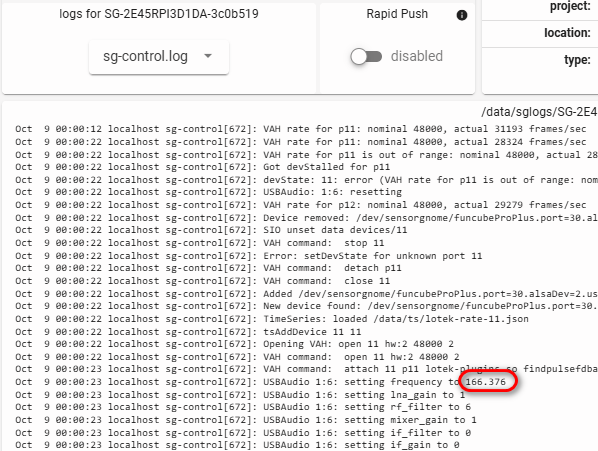
Also note that, while 151.5 is the frequency the tags broadcast at, it’s not actually what the FunCubes are set to. Rather, they are set 4 kHz below the nominal. You will be able to confirm this in your logs. I’ve given an example below of an SG here in Canada that listening for tags on 166.380. This adjustment should take place automatically when you select the nominal frequency in the UI, but it’s helpful context if you are looking in the sgcontrol logs and wonder why you are seeing frequency values of 151.496 instead of the 151.5 that you set! And example below of a receiver here in Canada listening for tags at the nominal frequency of 166.38
Sep 30 14:41:05 localhost sg-control[699]: ===== sg-control starting at 2025-09-30T14:41:05.913Z =====
Sep 30 14:41:05 localhost sg-control[699]: lotek freq: 151.5
Sep 30 14:41:05 localhost sg-control[699]: enableAGC: false
Sep 30 14:41:05 localhost sg-control[699]: setting rtlsdr frequency to 151.496
Sep 30 14:41:05 localhost sg-control[699]: setting funcubeProPlus frequency to 151.496
Sep 30 14:41:05 localhost sg-control[699]: setting funcubePro frequency to 151.496
Sep 30 14:41:05 localhost sg-control[699]: setting module_options.find_tags.params[1] to 151.5
So the frequency was set correctly in the SG at the recent boots I could see on SGhub. If you’re not seeing any pulses whatsoever in the web UI then either you have an extremely quiet RF environment or there’s something wrong, perhaps in the antenna path. Did you check all connectors? (Also make sure you’re not by mistake using an RP-SMA connector…)
I’m aware of the 4 kHz offset from the nominal tag frequency, but always better to be reminded than have it slip through the cracks.
I’ll rebuild the software of one of the stations from bare metal tomorrow, and compare the logs to the examples you’ve supplied for comparison, taking care to reset the boot count appropriately. (Note in turn that, unless there’s been a new SGv2 distro since sg-armv7-rpi-2.0-rc14.zip, it will still have the incorrect tag frequency for Australian tags, and I will have to edit /opt/sensorgnome/control/dashboard.jsand change it manually again).
To give a little more context, at the moment I have the three SGv1s that were removed from their field deployments, in preparation to be replaced with the new SGv2s. As a final check before deployment, one of the SGv2s was set up on the full mast and antenna rig that our PI has in her backyard as a test site. No pulses were coming through from an activated test tag, but they were visible on the SGv1 that she had on hand as a maintenance spare.
The PI then returned the SGv2 to me, along with a 1.5m whip antenna (with appropriate SMA connector) and an activated tag. All of the SGv1s can detect pulses using the antenna and tag; none of the SGv2s can. I’ve checked all the connections carefully, but it did seem a little bit unlikely that the same problem could be occurring on all three SGv2s unless it was something systemic )
Anyway, I’ll do the rebuild and log check in the morning, and report the results back tomorrow.
After much to-ing and fro-ing, I finally figured it out.
I did the rebuild of the SGv2 and re-checked all the connections, still with no success. The logs were reporting the correct frequency, the radio tag was still active (I checked it with one of the SGv1s again), but still no pulses.
Finally, more or less in desperation, I cross-connected the SGv2 to the FUNCube in one of the other SGv1 stations that I knew were receiving pulses… and the SGv2 came to life.
Doing it the other way round, and connecting the SGv1 to the FUNCube from the SGv2, and it stopped working. The radio pane on the SGv1 still reported that the FUNCube was there and apparently working correctly, but the receiver frequency was showing as 0 MHz rather than 151.500 MHz. And the same was true for all three of the FUNCubes on my new-build SGv2s.
That stirred a memory from way back when we were first putting the SGv1s together, and would occasionally have to reflash the firmware on the FUNCubes. I dug out the FUNCube configuration software from (never throw anything away if you don’t have to), and ran the reflash procedure, and all three FUNCubes came to life.
In hindsight, I should probably have thought of trying that earlier on, given that I did have the working SGv1s around to chop-and-change. (I tend to avoid swapping FUNCubes between stations unless I absolutely have to, because it simplifies the configuration management.) I guess I was lulled into a false sense of security because there were no errors being reported on the SGv2 radio UI.
Anyway, thank you all again for your patience while I stumbled around in confusion .
 !
! )
)