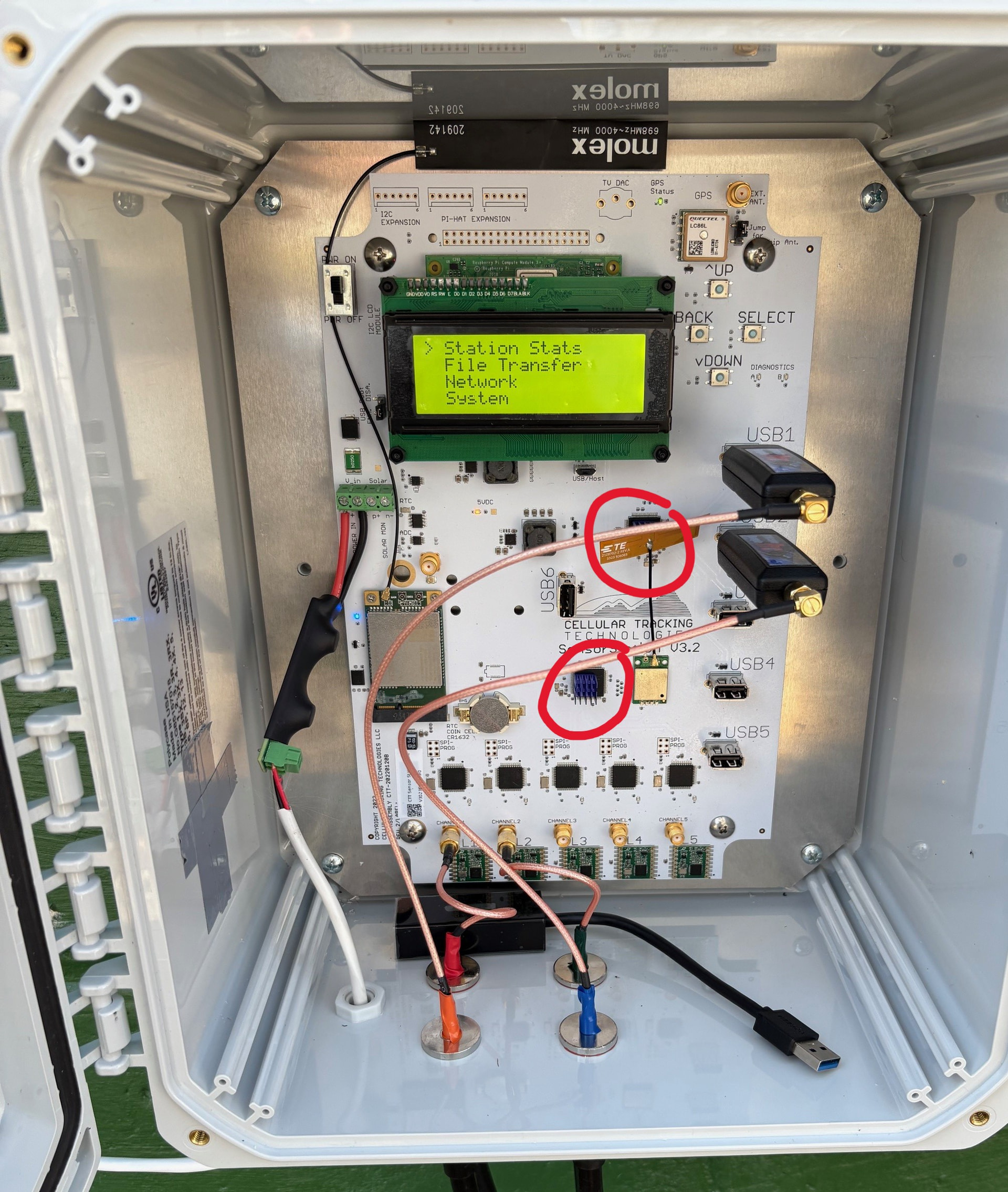
We have been working to understand and mitigate problems concerning SensorStation (mainly V3) FUNCube malfunctions. SensorStation USB hubs are prone to overheating, especially in hot conditions or when running 3 or more FUNCubes. This leads to FUNCubes being “kicked-off” periodically, effectively cutting off 166 radio data until the station reboots. This can be seen in the receiver timeline when evaluating antenna activity. Regardless of whether your SensorStation has undergone these FUNCube drop-outs, we have the following recommendations to ensure your station/s run as smoothly as possible:
Make sure you are running the most current Disk Image (new V3 stations should already have this installed)
Set your reboot schedule to weekly
Keep your SensorStation shaded / cooled, and housing them in air-conditioned rooms is the most effective!
I’m curious to hear if you’ve found a sort of “cut-off” temperature after which these problems start occurring, and whether you know if this is an issue that’s related specifically to USB hubs, or if it can also occur to FunCubes plugged directly into SensorStations. Overheating issues are something I’ve worried about for our setups, which are in relatively small boxes exposed to directly sunlight, but I haven’t seen (and therefore haven’t been able to test) overheating issues in our setups.
Lynn, I can’t say what the cutoff temperature is, because that will also depend on how many FUNCubes / USB ports are plugged in, which is also tied to the cell/wifi modems. And yes, when they are confined in a small box with no air circulation outside in direct sunlight, they can easily overheat. Though, we observe this more often in the southeastern US (where I am based) far more often than in the northeastern US / Canada. You can follow the instructions in the document to look at past data to determine if your stations have dropouts or not. And I’m not sure what you’re asking of USB problems or FUNCubes directly plugged into the SensorStations, because they have to use the USB ports. FUNCubes are quite power-hungry radio dongles, and thus they can easily overload the USB hub. Other radio dongles (RTL-SDRs) don’t appear to overwork the USB hubs nearly as much, but they are also far less effective for detecting tags, and thus we don’t recommend using them.
Patrick, there is a photo and more instructions / details in the document I attached. But here is another example of what heat sink application looks like, circled in red
Heatsinks on the dongles: yes & no. Heat increases electrical noise and temperature changes cause clock (frequency) drift. Reputable RTLSDRs have metal housings. The FUNcubes come in plastic housings IIRC so I would assume that cooling those does not have a lot of effect, but I could be wrong. A lot of the heat may actually be dissipated via the antenna cable?
For the SensorStation another step may be to get a small 5V or 12V fan and mount it in the box just to stir the air. I believe there are places you can get power and if you have an open USB port you could also butcher a USB cable to get at the +5/GND. If the FUNcubes are inside the box then this would help them too…
In the end, since many of us are putting these in closed boxes, the heat sinks are only doing something if there is cooler air in the box. I think it is coming down to this. As we add devices to these boxes (antennas, ethernet, power cleaners, etc.) we are heating the inside of the station box up, pushing past the design specs temps. There is a reason telecom systems are in air conditioned buildings. Sad to say, but it means cutting out some heat sources, which for most of us it means removing dongles.
After more testing, the best solution thus far is simply by setting the reboot schedule to Daily (“Every Day” > “Any day of the month”). I’ve been monitoring several stations that are in metal enclosures in the Florida Panhandle (as hot as a SensorStation can get) with three FunCubes, and it’s been running smoothly ever since. It’s also to incorporate the other suggestions I had at the beginning of this thread: keeping unused USB adapters unplugged, using heat sinks, turning off unused WiFi/Cell modems. Also, finding ways to shade the SensorStaiton housing from direct sunlight can also greatly help. So there shouldn’t be any need for removing dongles, I’d recommend trying this first
Polycase sells vents like the ones in the McMaster Carr link for the boxes I have been installing in a lot. I think those would work in the dessert parts of California (which I think might be even hotter than Florida), where it is generally dry.