If we can clarify the license of the existing code I can probably submit a pull request.
Update:
I have the .deb’s building (i.e. sensorgnome-build/build_packages/build_packages.py) with the attached modifications to the repository.
Yet to investigate a manual install process on a generic 32 bit Debian image
I am yet to investigate rpi-gen / build_raspbian.py at all, it does not work at this time.
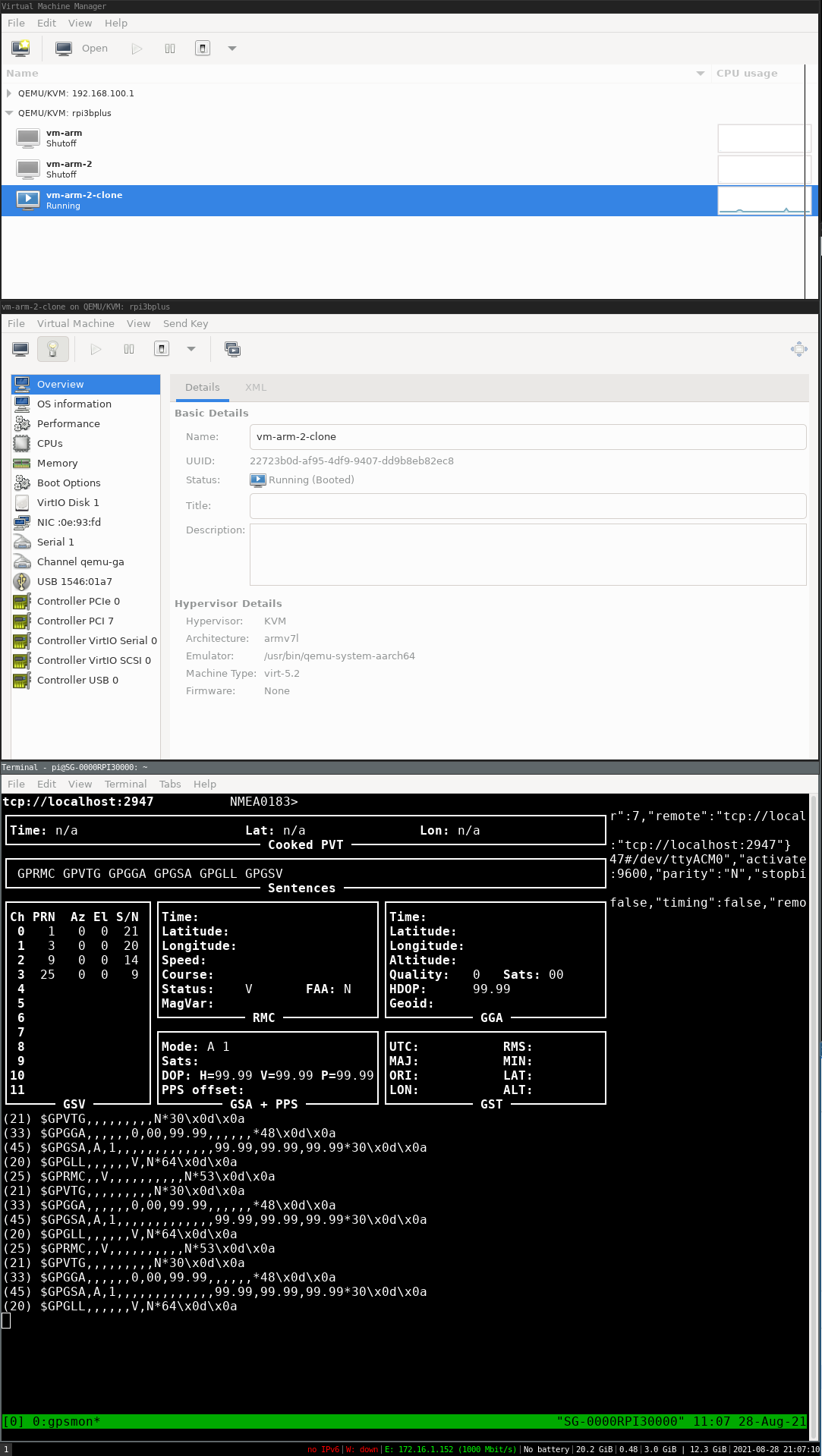
I have the 2018 image booting in a VM on an aarch64 host with usb passthrough for GPS time working.
TL;DR is new kernel with LPAE and CONFIG_PCI_HOST_GENERIC=y, plus the virtio drivers.
Further work to get the system working by this method is still going to require modification of the init scripts.
I’m yet to investigate booting the 2018 image with a new kernel on a 3bplus.
Still yet to investigate manual .deb install process on a generic 32 bit Debian image
I am yet to investigate rpi-gen / build_raspbian.py.
This is now low-priority as I have sourced enough RPI-3B (non plus) boards for the moment.
Nothing of note for distribution yet.
Work has mostly been reading/testing a few ideas with rpi-gen.
Some further work on automated OS image testing.
Since I'm writing, I've had a thought for polling the distribution list :
->How committed are we to retaining the "LIWIXI" implementation?
(i.e. loop mounted root FS, everything in one FAT32 partition)
-> Who is using the functionality, other than for initial setup?
(e.g. windows users need to put SD card back into computer to extract data)
-> Are users comfortable writing an image to an SD card instead?
-> Are multiple fat32/exfat partitions acceptable instead?
-> alternative I've thought of is put data onto separate USB flash drive
FYI, I’m currently getting the sensorgnome-build process to a working state. The nice thing is that almost everything is pretty standard RaspberryPi OS as a result. In terms of partitions, the SDcard ends up with a boot, a root, and a data partition. The latter is fat32, I suppose for Windows folks to be able to plug it into their computer to get at data. Seems better to me to support plugging a flash drive in and have the SG automatically copy the data over. Isn’t that something the SS variant does?
Hi Thorsten.
Glad things are progressing regarding build on your end.
"In terms of partitions, the SDcard ends up with a boot, a root, and a data partition. The latter is fat32, I suppose for Windows folks to be able to plug it into their computer to get at data. "
I believe this will depend on the size of the vfat boot partition. I think it is going to be quite small under a standard pi-gen build, I don’t have my build VM booted to check.
I don’t have experience on the growth rate nor access patterns for the resulting telemetry data.
Separate root file system and data partition sounds excellent.
a cursory look at the current boot scripts indicates that it mounts mmcblk0p1 under /dev/sdcard and symlinks it to /media/SD_card
“Seems better to me to support plugging a flash drive in and have the SG automatically copy the data over. Isn’t that something the SS variant does?”
looking at what is done under /media there appears to be some code that looks for other devices
Setting up an option for backing up the data is good, as logging to single SD card / USB device makes me uneasy.
I am not familiar with current behaviour, I just got the build/ boot working, and was going to start stripping out code once I could automate testing.
extracts using grep from the home directory of the current image:
pi/proj/sensorgnome/scripts/boottime.sh-73-# might contain real data.
pi/proj/sensorgnome/scripts/boottime.sh-74-
pi/proj/sensorgnome/scripts/boottime.sh:75:for dir in /media/diskport; do
pi/proj/sensorgnome/scripts/boottime.sh-76- if ( ! ( mount -l | grep -q " on $dir " ) ); then
pi/proj/sensorgnome/scripts/boottime.sh-77- if [ “$(ls -A $dir 2> /dev/null)” == “” ]; then
(END)
pi/proj/sensorgnome/master/datasaver.js-41- .wav - for raw audio
pi/proj/sensorgnome/master/datasaver.js-42-
pi/proj/sensorgnome/master/datasaver.js:43: - the “SGdata” folder is created in the first (alphabetically) directory in /media for which
pi/proj/sensorgnome/master/datasaver.js:44: the corresponding drive has at least 1M available. Directories in /media have these names:
pi/proj/sensorgnome/master/datasaver.js-45-
pi/proj/sensorgnome/master/datasaver.js:46: /media/disk_port1-1 disk in USB port 1, partition 1
pi/proj/sensorgnome/master/datasaver.js:47: /media/disk_port1-2 disk in USB port 1, partition 2
pi/proj/sensorgnome/master/datasaver.js-48- …
pi/proj/sensorgnome/master/datasaver.js:49: /media/disk_port2-1 disk in USB port 2, partition 1
pi/proj/sensorgnome/master/datasaver.js-50- …
pi/proj/sensorgnome/master/datasaver.js:51: /media/SD_card micro SD card
pi/proj/sensorgnome/master/datasaver.js-52-
pi/proj/sensorgnome/master/datasaver.js-53-
pi/proj/sensorgnome/master/datasaver.js-122- while (this.mountedDisks.length ) {
pi/proj/sensorgnome/master/datasaver.js-123- try {
pi/proj/sensorgnome/master/datasaver.js:124: var dirs = [“media”, this.mountedDisks[0]].concat(relpath);
pi/proj/sensorgnome/master/datasaver.js-125- var path = “/” + dirs.join(“/”) + ext;
pi/proj/sensorgnome/master/datasaver.js-126- // make sure we can write to this location
pi/proj/sensorgnome/master/datasaver.js:127: var bogusFile = “/media/” + this.mountedDisks[0] + “/” + Math.random();
pi/proj/sensorgnome/master/datasaver.js-128- var fd = Fs.openSync(bogusFile, “w”);
pi/proj/sensorgnome/master/datasaver.js-129- Fs.writeSync(fd, “IGNORE - FOR SPACE VERIFICATION ONLY\n”, 0);