Hey this may seem like a very basic question to you all, but I am struggling to reach the interface on my Raspberry Pi sensorgnome.
I’ve installed the software onto the microSD card and inserted that into the Raspberry Pi 3B. Plugged in an Ethernet cable and hooked it up to a computer, and powered on the pi. The computer knows that it is hooked up to something as indicated by the yellow ! icon on the network symbol. However whenever I go into chrome to type in the 192.168.7.2 IP address or sgpi.local , nothing pops up and it just gives the generic No Internet page. I’ve tried this on multiple browsers on multiple computers and its always the same thing. This is my first sensorgnome project so any help would be greatly appreciated.
This happened to me once on one of our PIs. I just wiped the SD card clean, redownloaded and set up the SD card again with the latest release and it worked just fine. You may have to make sure the SD card is formatted (which will wipe everything anyways). Let me know if that works.
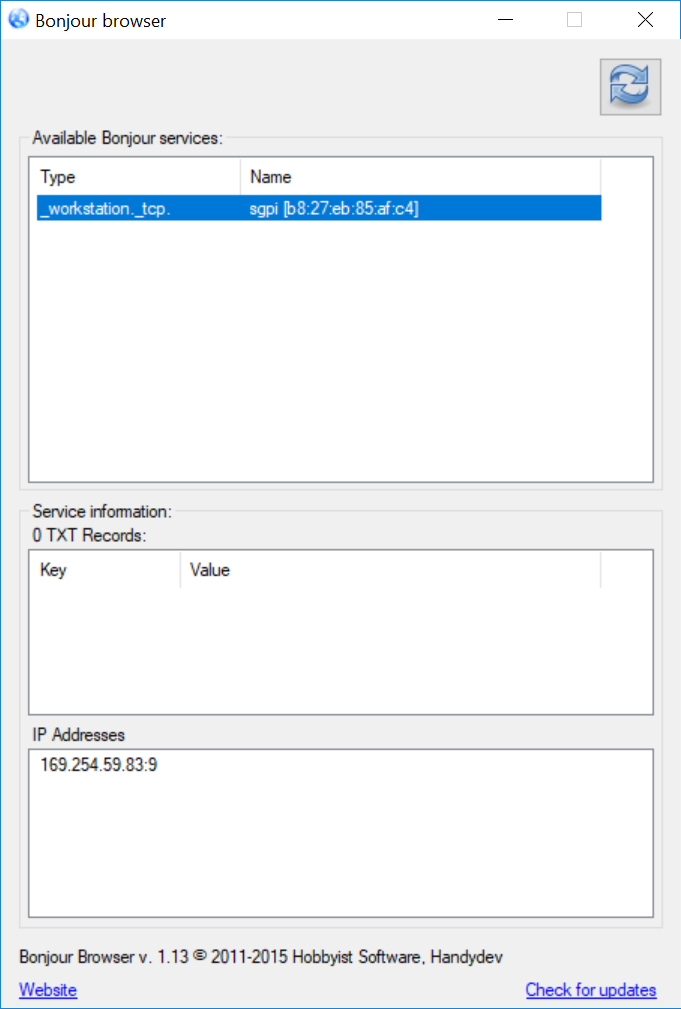
Then, connect your SG to your computer like normal. Give it a few seconds to establish a connection. Then open the Bonjour browser and find your SensorGnome in the “Available Bonjour Services” section. It will typically have a name that begins with “sgpi”. CLick on it and the IP address it has established with your computer will be shown at the bottom. Use this IP address to access the web interface in your browser. For the example here, I’d browse to 169.254.59.83 to find the web interface.
Just wanted to chime in that when connecting with an Ethernet on a computer with Bonjour installed (or iTunes, which includes it as packaged software) you should be able to connect via http://sgpi.local. The path used to connect over the WiFi Hotspot, or a BeagleBone (http://192.168.7.2) will not likely work.