As a volunteer for a local nature center I’ve been getting data off the SensorGnome, uploading it, and that’s about it. I’m now trying to validate that the data actually is good or has detection’s for migrating birds.
I figured the path to that knowledge goes through me getting up to speed with R. I’m now a few hours into that Motus R Book tutorial and I can’t even validate that the sample data project (176) even has detection data in it.
All commands seem to execute properly, but the file I have locally now project-176.motus at 220KB in size doesn’t really seem to have any actual data in it at all. In fact thinking I’d done something wrong I started over several times and came to the same point. In section 3.8 the tellme command is introduced that would allow to validate what data might be available for download. A version of that command will even allow evaluation if you haven’t downloaded any data yet.
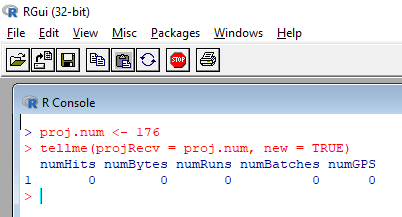
tellme(projRecv = proj.num, new = TRUE)
I ran that command after starting a new R session and deleting all pre-existing downloads centered on project 176. (Effectively started from scratch.) The results of the tellme command for project 176 were a bunch of zeros. (See attached.)
I guess I’m at ground zero. Hoping for some help to nudge me in the right direction so I can progress through the guide with actual data to show me how these commands work.
Thanks for any help.