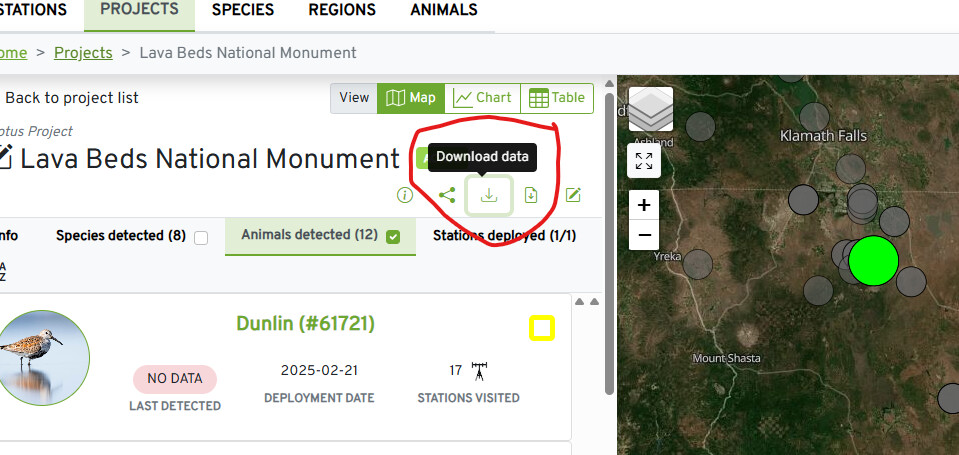
I have been added as a collaborator to the project, so I should have access to the data.
I only know of how to download pre-filtered data using the Motus R package.
I am trying to figure out the ‘Download data’ button on the Projects page ( Explore Data ).
Regardless of what animals or species I select, or what project I am under, the resulting download is full of detections from other stations under stationName and other species.
Hi there, I am also listed as a collaborator on a project, and the project results include many station locations. Once you load the data in R it is relatively easy to filter for the station you are focused on. I seem to be able to load the raw data in R without filtering out any data. For example, we are using data for a very specific list of birds within a specific time frame including data from all run lengths rather than filtering out shorter ones. We seem to be able to do this successfully. I can share my R script for downloading and filtering by receiver if that is helpful? Feel free to reach out to me by email if that is easier, I’m at cmacneil@yukonu.ca
Hi all, I just wanted to mention that data downloaded through the R package is not pre-filtered - it is all detections, including short run lengths. So you can access raw data through the R package. Data displayed on the dashboard and Motus website has been pre-filtered to remove short runs.
Hi Dylan, are you using Lotek or CTT tags? If I recall correctly, it does include run lengths of 1 for CTT tags, but for Lotek, the minimum run length possible is two because the unique motusTagID is the combination of the encoded ID plus the burst interval. So it’s not possible to have a run length of 1 for Lotek tags because the amount of time elapsed between bursts is part of what identifies the tag.