When using a SensorGnome (or a SensorStation connected to a SensorGnome interface), it’s easy to see whether the SG recognises an SDR: it will show up in the list of devices. If you remove the SDR, it’ll also vanish from the devices list in real time. Suppose we’ve got a Motus station somewhere remote that we would not like to visit more than a few times per year. Is it possible to access information about the devices connected to a Motus station from the Motus servers? This would be helpful in cases where, for instance, an SDR fails during operation.
Hi Lynn, the V2 SG software, when connected to the internet, does display this. That’s all on SGhub. Note that SensorStations don’t yet support the V2 SG software
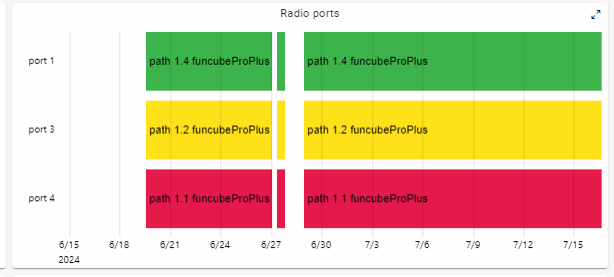
That’s a really nice graph for those using SGs, and it’s also more or less what I’m looking for. If this info is not (yet) available for SensorStations, what would be the best way of monitoring the status of a SensorStation? I’ve read that any active station shows up on the map, and they can be accessed from the page of the associated project as well. Any station I’ve checked on those pages, however, does not seem to provide much information on uptime and such.
Below is an example of a station I found on the map. It lists all the antennas used, but I think it’s just listed as station metadata and is never checked. It displays the current status as active, but I can’t see any history on its status.
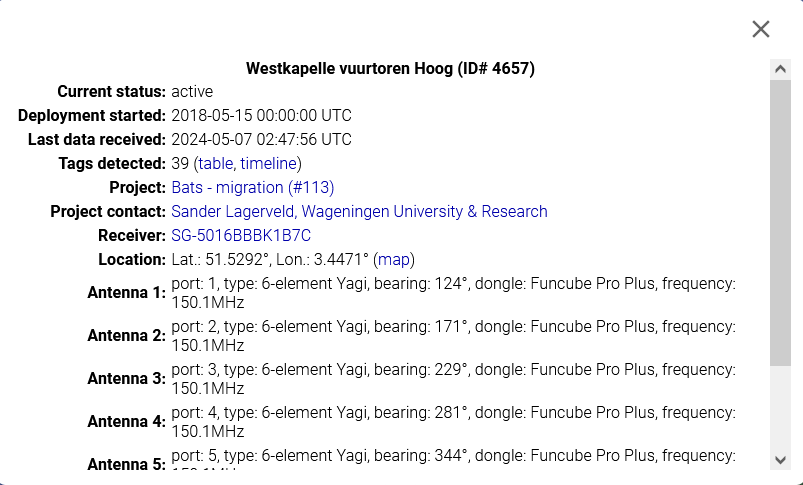
There is the option to view a table showing its tag detections, but generally you’d just download your tag detections from your project page.
I suppose my question becomes, then: how do people who use SensorStations generally monitor their station’s health/status without having to visit the station?
I’ve been testing the connection of the SensorGnome/SensorStation to the online network. The SG’s ID is 1173RPI39774, and it’s running V1 software. I’ve managed to get it to show up in www.sensorgnome.org/status/, but it does not show up in www.sensorgnome.net (likely due to not running V2 software).
The SensorStation, however, does not seem to show up in www.sensorgnome.org/status/ either. Both the SG and the SS are connected to the same (2.4GHz) wifi network, and the SS is connected to my laptop via ethernet as well. Its ID is CTT-V3023D36D724. In fact, the list of SGs does not seem to display any SS, as there is no ID at all in that list starting with CTT. I have seen some SSs show up under the “FUNcube checker (V1 Sensorgnomes/Sensorstations)” section on www.sensorgnome.net. If I want to test that my SS is actually able to communicate with the Motus server, what list should it show up in?
Hi Lynn, there are actually a few different pathways by which raw data makes it to the Motus database. There’s more info on that here, though that doc and diagram doesn’t yet include V2 SG. You are correct that the V1 SG will not show up on sensorgnome.net.
(At this point, there’s not much reason to not use the V2 software, especially as it includes so much more in terms of logging and diagnostics)
Currently, SensorStations will not show up on either sensorgnome.net or sensorgnome.org. The exception is those with the “FunCube checker” installed, which was related to some specific testing.
So, you have a few options to confirm that your SS is running and connecting.
- While at the device, select
Network > Pingon the menu to see if it’s “connected” - Sign up for a CTT portal account and then email support@celltracktech.com to confirm that your SensorStation is associated with your account. Here you’ll be able to see various status indicators, including internet connectivity.
- You can also refer to the “last data received” value for your station either on Motus.org.
I don’t see these particular receivers registered to Motus. You’ll want to register those and associate them with stations to ensure proper data flow.