My inner geek is exhausted! I have followed instructions to delete files from an almost-full SD card in my sensorstation using the web interface, Filezilla, and command prompt, and in every case (despite success messages, in some cases), the files remain on the card, leaving no space for new data. I finally got Filezilla to recognize the sensorstation by using pi as the user and raspberry as the password, but despite changing the permissions so that anyone should be able to drwe the files, couldn’t delete them. When I changed the user/password to root/root, the directories completely disappeared.
In command-prompt, root was not recognized as the password for user root. It may be possible that the password was changed before I got this sensorstation. It had previously been tested and even deployed briefly by BirdsCanada. Is there any way for me to delete files and free up some space?
I haven’t yet had to delete the data from the onboard SensorStation storage myself. I just checked their online guide but they only make mention of deleting via the web interface.
If that’s not working hopefully someone from CTT can chime in with some alternate options (or anyone else who has had used some other workaround)
Are you using a CTT SensorStation?
If so, there’s little chance you’re going to run out of space unless there’s a really noisy channel, but I can definitely help you out.
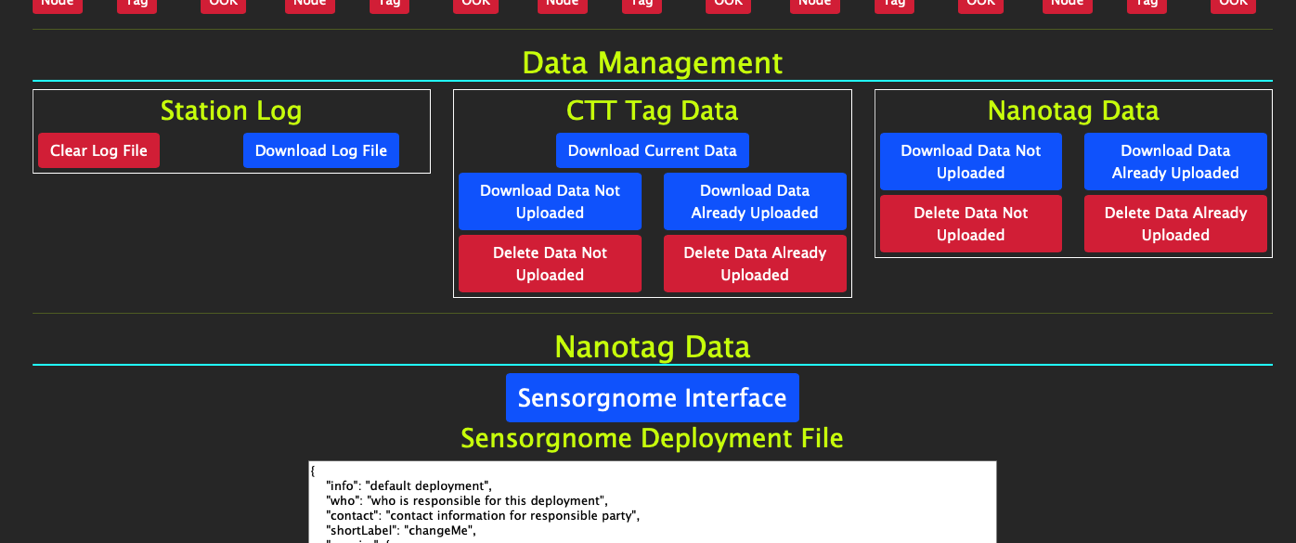
You can connect directly to your SensorStation via a computer and from the web interface can click the buttons for deleting the data on-board. You do have to be directly connected to a station to do so. The red buttons are the ones that delete data on the station. Assuming your stations are sending data over the cell network or via a connected wifi or internet ethernet cable, you can just delete data already uploaded, which will remove the local copy from your SensorStation, but won’t delete any data that hasn’t already been uploaded. For stations where you are manually downloading data, you’d obviously want to manually download the data first, confirm it was downloaded, and then delete data not uploaded.
Cheers
David
David A. La Puma, PhD (He/Him) • Vice President, Global Market Development
celltracktech.com • (609) 889-0305 x104 • Book Time With Me
“If we did all of the things we are capable of, we would astound ourselves.” - Thomas Edison